Free Printable Check Box Stickers for Your Happy Planner (Cricut, Silhouette & Print-and-Cut!)
If you use a Happy Planner — or any 7×9, A5, or letter-size planner — check boxes are one of those small additions that make a surprisingly big difference. Whether you’re tracking habits, building a to-do list, or mapping out appointments, a clean check box gives your task a visual home and makes crossing things off genuinely satisfying.
I learned this the hard way. And then I made something better. And now I’m giving it to you — completely free.
What Is the Happy Planner? (And Why Check Boxes Matter)
The Happy Planner by Me & My Big Ideas is one of the most popular disc-bound planners on the market. Its open layout and customizable pages make it a favorite in the planning community — but that open layout also means it’s up to you to create structure on the page.
That’s where check boxes come in. A simple box next to a task does three powerful things:
- Creates visual clarity — your eye immediately knows “this is an action item”
- Signals completion — checking a box gives a small but real sense of accomplishment
- Builds accountability — an unchecked box at day’s end tells you exactly what got missed
Most planners don’t include enough of them. That’s why planner stickers — and specifically check box sticker sheets — have become such a staple in the planning community.
My Check Box Story: From Frustrated to Free Download
When I first started using my Happy Planner, I bought the Me & My Big Ideas Line It Up, Check It Off Stencils thinking they’d be the perfect solution. The idea was great. The execution? Not so much — at least not for me.
No matter how carefully I lined them up, I couldn’t get clean, consistent boxes. They shifted, smudged, and never quite aligned with my planner’s grid. I tried different pens, different techniques, and a fair amount of muttering under my breath. I finally set the stencils aside and decided: if I want this done right, I need to make my own.
So I did. I designed my own clean, minimal check box sticker set — and honestly? They’ve become one of the most-used tools in my entire planning setup. I use them every single week without fail.
They’re so useful that I want to share them with the entire planner community — for free.
What You Can Use Check Box Stickers For:
- Daily to-do lists — one box per task, satisfying to check off
- Habit tracking — check off each day you hit your goal
- Appointment reminders — confirm when you’ve prepped or followed up
- Shopping lists — check as you go through the store
- Project milestones — break big goals into checkable steps
- Reading or watching lists — track what you’ve finished
- Packing lists — for travel, events, or holiday prep
The design is intentionally simple and clean so they work with *any* spread style — minimal, colorful, functional, or decorative.

Check Box Sticker Questions
: The stickers are sized to work with Classic Happy Planner, Big Happy Planner, and most standard 7×9, letter-size, and A5 planners. Both framed (with a border) and unframed versions are included so you can choose the look that fits your spread.
A: No. The stickers are formatted for printing only.
A: Not at all. The PDF files include faint cut lines so you can print and cut by hand with scissors or an X-Acto knife. The cutting machines just make it faster and more precise.
A: Framed boxes have a visible border around them — great for adding a defined look to your layout. Unframed boxes are borderless — they blend more seamlessly into your spread for a cleaner, minimal aesthetic.
A: Yes — removable sticker paper works great in most cutting machines. The Rock Paper Scissors Removable Sticker Sheets listed in the Resources section are specifically tested and work well with cutting machines.
A: Make sure you’re copying the code exactly as it appears in the welcome email (no extra spaces). The coupon applies to the check box sticker listing in the Primfection Designs shop. If you still have trouble, send me an email and I’ll sort it out!
A: Build flexibility into the plan from the start. Leave your last “shopping week” buffer intentionally empty. Don’t schedule every gift purchase to the last possible minute. And remember: gift cards exist for exactly this scenario and there is zero shame in using them. A gift given with warmth is always the right gift.
A: Please share the link to this post so they can sign up and get their own copy — don’t share the download file directly, as it’s tied to my email list. The more the merrier, though — sharing is caring in the planner community! 💕
What’s Included:
Ready to grab them? Sign up below and I’ll send the download link straight to your inbox. No strings attached — just free stickers from one planner lover to another.
What’s included in the free download:
- Files for Checkboxes for classic Happy Planner (7″x9″)
- Files for Checkboxes for large Happy Planner (8.5″x11″)
- Files for Framed Checkboxes for classic Happy Planner (7″x9″)
- Files for Framed Checkboxes for large Happy Planner (8.5″x11″)
All sizes will have the following file formats: JPG, PNG, PDF, Silhouette, cutting instruction for Circuit (using PGN file).
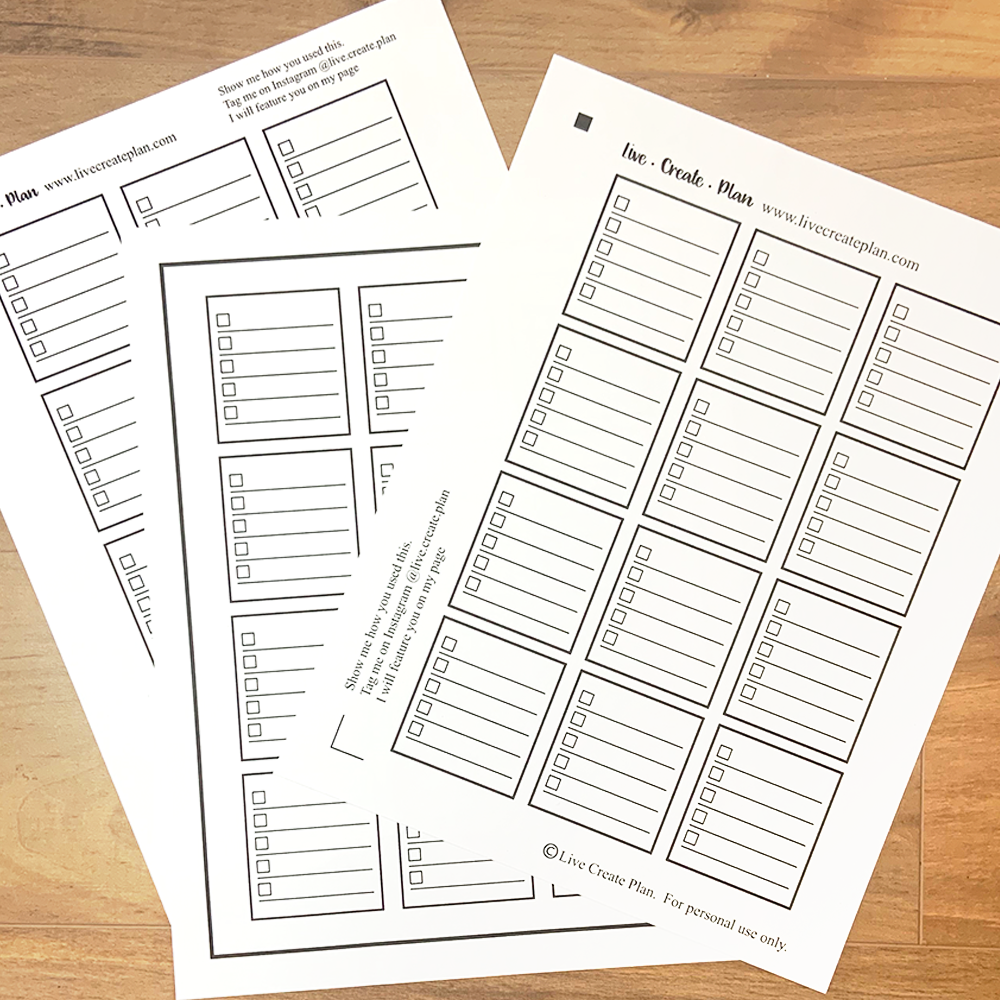
Don’t have a cutting machine or would rather just have them printed, cut and sent to you? Inside is a special 70% coupon code for the Check Boxes in my Etsy store, Primfection Designs. (A girl needs to cover my costs)
Don’t have a Silhouette or Circuit? Not a problem. Print them out the PDF files at 100% and cut then by hand. Faint cut marks have been added on the PDF files so they can be cut by hand.
BEFORE YOU PRINT:
- Use removable sticker paper — it’s so much more forgiving than permanent sticker paper, especially if you’re still finding your planner style
- Load the paper correctly in your printer (sticker side up for most inkjet printers — check your printer manual)
SIMPLE CUTTING GUIDELINES:
- To print:
- Open the PDF file and set print scale to 100% (actual size) — do NOT select “Fit to Page” or the sizes will be off
- To cut by hand:
- Simply use scissors or a paper cutter using the faint lines as a guide
- OR use an X-Acto knife and a metal ruler along the faint cut marks printed on the page
- Cut through the sticker layer only — leave the backing paper intact
- Work on a self-healing cutting mat to protect your surface
- To cut with Silhouette:
- Use the included Silhouette cut file
- See the cutting tips document included in the download for machine settings
- To cut with Cricut:
- Use the included PNG file
- Upload as a cut image in Cricut Design Space
- See the cutting tips document included in the download for settings
RESOURCES:
 | Rock Paper Scissors Removable Sticker Sheets
|
 | Plain White Full Sheet Stickers
|
 | Me & My BIG ideas Line It Up Check It Off Stencil
|
| **** above are affiliate Amazon links where I get a small percentage of the sale. Your price for the item will be the same and not increase. |